The Problem
An accountant I knew described his worst recurring job to me. His clients send him bank statements as PDFs. Before he can do anything useful with them, every transaction on every page has to exist as a row in a spreadsheet. For a catch-up engagement that can mean a year of statements across several accounts, arriving all at once, usually late.
His words when I asked him about it: "I hate this process so much it makes me want to pull my hair out. If there was a solution like the one you describe, it would be a god-send."
The obvious read is that the job is slow. That read is wrong, and building against it would have produced a product he had already rejected twice.
What He Had Tried
He had not been sitting still. He had tried two things, and both had failed him in ways worth understanding.
He tried PDF-to-Excel converters. Bank statements vary constantly in layout, and the converters produced spreadsheets with columns misaligned, values in the wrong fields, and rows split or merged. Repairing one of those files took longer than typing the statement in from scratch. He worked that out and went back to typing.
He tried delegating it. Junior staff keyed transactions and he reviewed the result. The keying was slow, and it was error-prone in a specific way: the mistakes were invisible until a total refused to reconcile. Then he would go looking, line by line, for one wrong digit inside hundreds of rows. That happened on nearly every file. And when the junior staff fell behind, he did the keying himself, faster than they could, which meant the most expensive person in the firm was doing the cheapest work in the firm.
Both failures are the same failure. Neither approach produced output he could trust without checking it, and checking it cost about as much as doing it. Speed was never the constraint. Trust was. That reframing set the actual design problem: not how to convert a PDF quickly, but how to produce a spreadsheet an accountant does not feel he has to verify twice.
No New Software
Flowboost has no interface. There is no app to open, no portal to log into, and no account to create. The accountant drops PDFs into a folder called To Process inside his own OneDrive, and the finished Excel file appears under Processed.
That came out of watching how he already worked. His clients' financial documents already lived in OneDrive, organized his way, and he opened it every day. He is also not a particularly technical person. Any separate tool would have meant learning new software, then exporting the result and importing it back into OneDrive anyway to keep his filing intact. The work of adopting the product would have landed entirely on him.
So instead of asking him to come to the product, I put the product inside the tool he already trusted. The entire user-facing interaction is dragging a file into a folder, which is something he knew how to do before Flowboost existed.
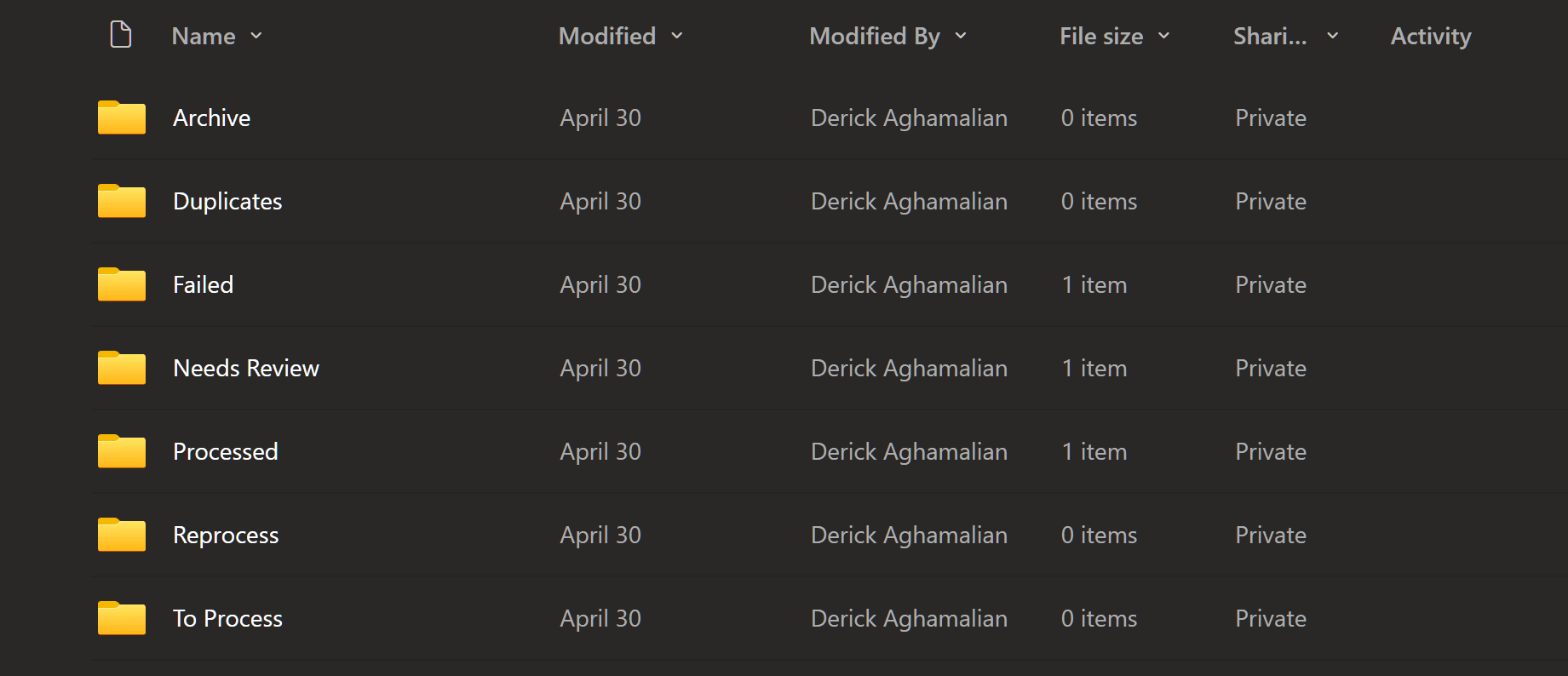
The folders do more than hold files. Each client has a set of them, one level down from the fiscal year the statements belong to, and a statement moves between them as it is handled: To Process, then Needs Review once the transactions are in the spreadsheet, or Failed if the write did not complete, with Duplicates, Reprocess and Archive for the other cases. Where a file is sitting is its status. He can see what happened to a statement without opening anything.
Putting the fiscal year above the processing folders rather than beside them was a decision that paid off later, when he asked for something I will come back to.
This is also what separates Flowboost from Dext, Hubdoc and DocuClipper, which are self-serve tools requiring per-statement effort inside their own software. That difference is real and we sell on it. It was a consequence of the design decision rather than the reason for it.
Trusting the Output
The pipeline reads statements with OCR, then passes the OCR result to Claude to interpret rather than trusting the raw extraction. That decision alone was not enough, because the failures that matter are not the ones that look like failures.
We ran a two-month foundation phase with the client before he relied on it. I told him up front to expect mistakes and asked him to send statements from as many banks and account types as he could find. Every error became a change to the extraction instructions, then a retest. After those two months the system carried his real work, and new bugs surfaced occasionally as unfamiliar statement formats arrived. Two of them taught me more than the rest.
The first came from an RBC credit card statement carrying two cards on one bill, a primary cardholder and a family member. The OCR handed the statement over as a series of separate tables rather than one continuous list, and the first card's table ended with a row reading SUBTOTAL OF MONTHLY ACTIVITY. The parser read that as the end of the statement and stopped. Three transactions came out. Everything belonging to the second card was silently dropped. The run reported success. The notification email reported success. The only thing wrong was the file, and only if you opened it and counted.
The second was worse. Some transactions occupy more than one line on a statement, and the parser was joining those lines together. When it joined them, it added their amounts. On one CIBC chequing statement, three separate fee lines of 81.00, 18.00 and 6.00 came out as a single row of 105.00, a number that appears nowhere in the PDF. The reason it survived was arithmetic: 81 plus 18 plus 6 is 105, so the running balance still reconciled and the statement totals still matched. Every check a reasonable person would design passed, because a merge preserves the sum whose detail it destroys.
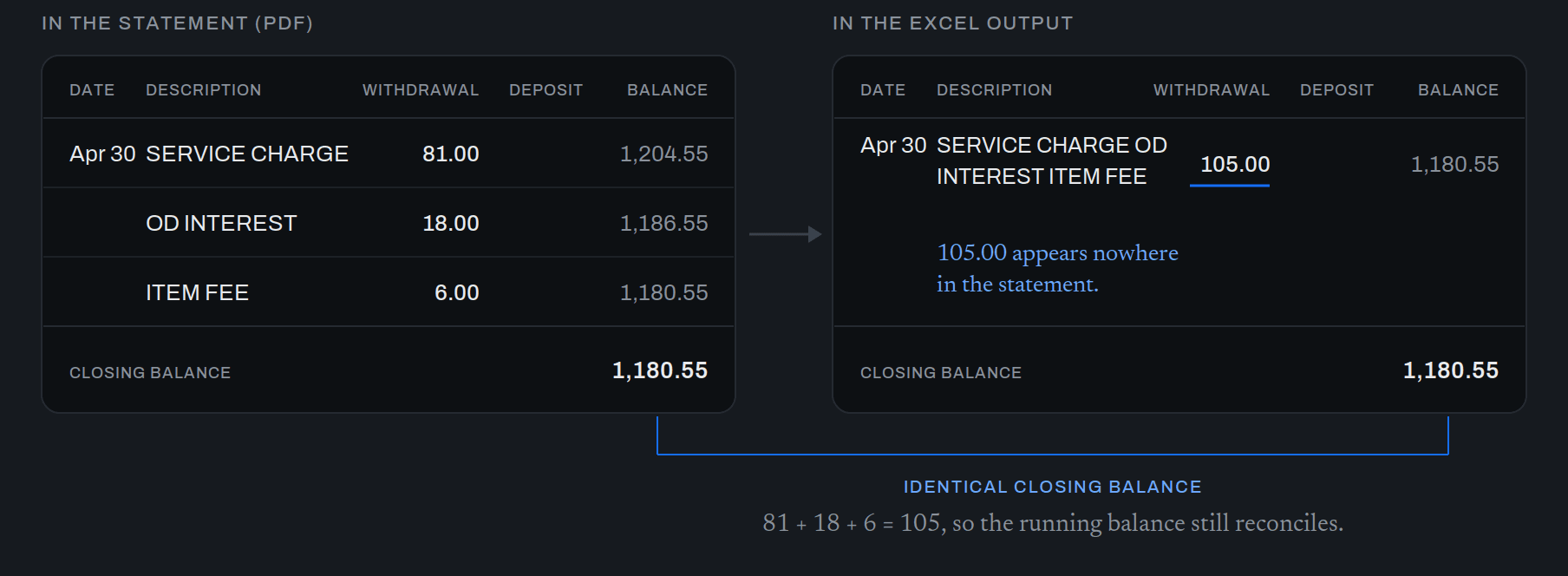
Both fixes were rules in the extraction instructions. A row counts as a transaction if it has an amount, because CIBC prints a date only once per day and the previous rule had been silently discarding most rows. Only join a line upward if it has no amount and no balance of its own. Never add two amounts together. Read every table, because a subtotal marks the end of a card and not the end of a statement.
The rules were the smaller lesson. The larger one is that verification had to change shape. Reconciling totals cannot detect a merge, and a success status reports whether the machine finished, not whether the data is right. What catches both is counting: how many transactions were on the statement, and how many rows came out.
Correct but Wrong
A balance printed as 18.81OD means the account is overdrawn by 18.81. The pipeline was storing it as 18.81, which is the right number attached to the wrong meaning, and which reads in a spreadsheet as money the client does not have.
The number was never wrong. The accounting was. I did not decide the convention myself, because the person who would live with the consequences knew it better than I did. I took it to the client, and we settled on storing an overdrawn balance as a negative figure.
That case is why human review stayed in the design rather than being engineered away. This is accounting data, and a wrong figure has consequences that reach a tax filing. I told the client from the beginning that a person would always review the output, and I would rather say that plainly than sell an accuracy claim I cannot guarantee. It also changes what the product owes him. If he is expected to review the result, the system has to hand him something worth reviewing and tell him what to look at.
Fiscal Year Splitting
He asked for one thing he assumed was impossible. Not every business runs on a calendar year, and a statement spanning a client's year end has to be split so each fiscal year lands in its own file. He said if it were feasible it would be incredible, and he did not expect it to be.
It was feasible because the pipeline already knew which client each statement belonged to, so a year end had somewhere to attach. I added a lookup table where he enters a client name and that client's year end month, and updated the scenario logic to detect a statement crossing two fiscal years and produce a separate file for each.
The part I care about is the default. Any client he does not enter falls back to a December year end, which is most of them. So the only clients he ever has to think about are the exceptions, and the common case requires nothing from him at all. That is the same decision as putting the product inside OneDrive, applied to a different problem: keep the surface the user has to learn as small as the work allows.
What He Sees
A product with no screens still has an interface. Here it is the folders and the notifications, and the notifications are where I decided what the user needs to know.
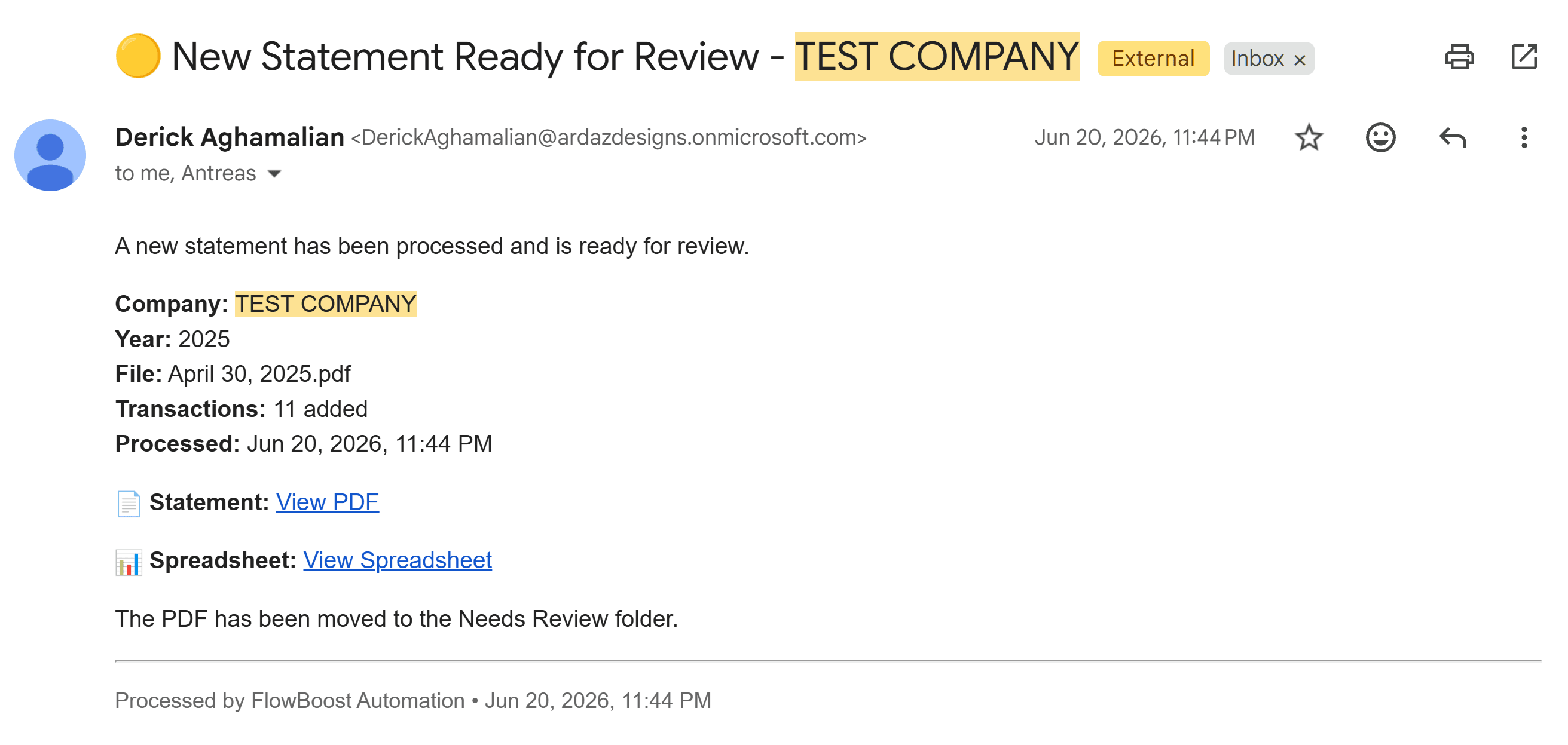
He gets one email per statement. A success email is short and carries only what he would act on: which statement was processed, which of his clients it belongs to, how many transactions were added, when it ran, and links to both the source PDF and the Excel file in his own OneDrive. That transaction count is the number that matters most, because it is the one thing that catches the failure arithmetic cannot see, sitting in front of the person able to act on it.
A failure email does more work, and it is deliberately longer than the success email, because a failing user needs more than a succeeding one. It tells him the file has been moved to the Failed folder, identifies the statement and the client and the year end it was for, and then gives him the likely cause and what to do about it. If the target Excel file was open in another window while the statement was processing, the write fails, so the email says to check for that, wait a couple of minutes, and upload the file again. Often that is all it takes and he never contacts us. When it does not work, he does, and we resolve it on our side and process the statement for him.
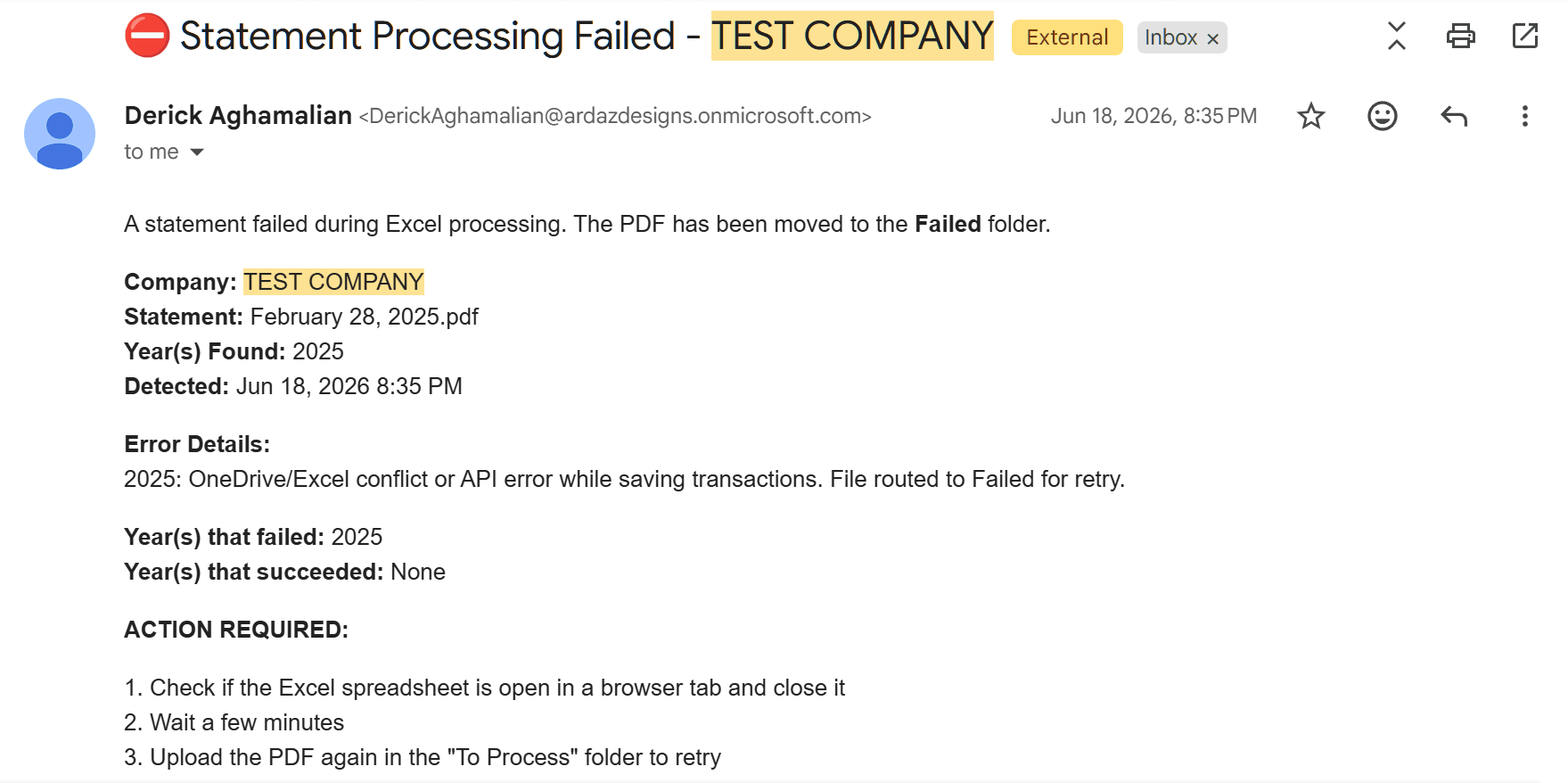
Putting the probable cause in the email instead of a generic error was a support decision as much as a design one. It makes the user the first responder to the most common failure, which is the difference between a two-person company running a service and a two-person company answering the phone all day.
Outcome
The pipeline has processed more than 800 statements and more than 17,000 transactions for this client.
His own account of what it replaced: the manual work had been costing his firm over 300 hours a year, and a client arriving with a year of statements at the last minute would have taken two to three days to clear. That one took 20 minutes.
His message afterward: "Dude this has been perfect. Converted 400 lines in minutes and I didn't have to pay anyone to type it out. The monthly fee to you guys already got covered."